

52-Port Gigabit Smart Managed Stackable PoE+ Switch with 48 PoE+ 1000Base-T and 4 SFP+ Ports
DGS-1530-52P
- 48 Gigabit PoE+ ports and 4 10G SFP+ uplink ports
- Supports PoE/PoE+ (802.3af/at), power budget 370 W (expandable to 740 W)
- 6kV surge protection on all Gigabit Ethernet ports
- Physical stacking up to 9 switches
- Supports Redundant Power Supply (RPS)
- ZTP (Zero-Touch Provisioning)
- Ethernet Ring Protection Switching (ERPS)
- IEEE 802.1ag for Connectivity Fault Management
- Advanced L2+ and Security features
- Easy management via a user-friendly Web GUI
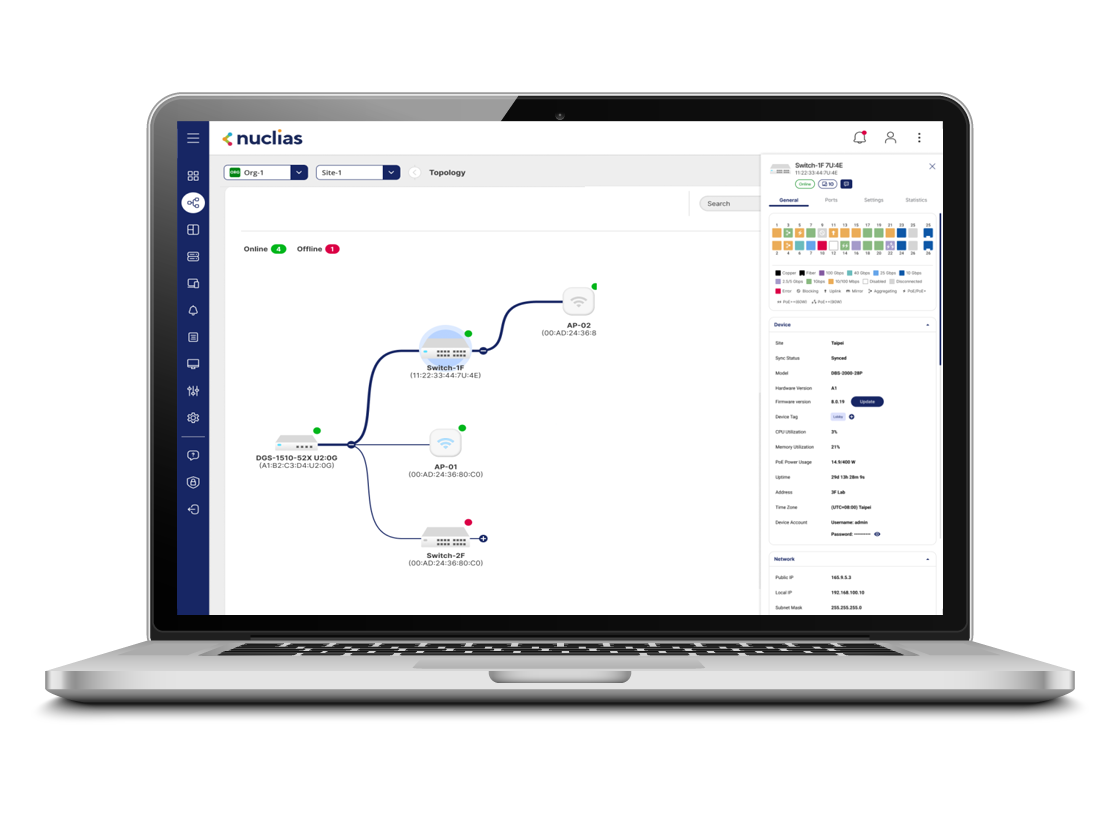
- Centralised management through cloud-based Nuclias Unity and on-premises software Nuclias Hyper
User Benefits

Uninterrupted Service
Redundant power supply ensures uninterrupted operation while boosting PoE output for high-demand devices

Simplified Management
The SIM feature lets you manage multiple switches as a virtual stack under one IP, streamlining operations and integration

Enhanced Security
Features includes VLANs, ACLs, Port Security, 802.1X, and RADIUS to protect data and manage access

Resilience Connectivity
G.8032 ERPS delivers sub-millisecond ring recovery for uninterrupted connectivity across critical operations

Seamless Power Delivery
PD-Alive, Fast PoE, and Perpetual PoE ensure rapid startup, automatic device recovery, and uninterrupted power supply

Shielded for Stability
All copper ports include 6kV surge protection for reliability and protection against electrical spikes
Zero-Touch Setup, Infinite Scalability
Zero-Touch Provisioning (ZTP) streamlines setup by enabling devices to auto-configure without manual input. Simply hold the reset button for 5–10 seconds to trigger reboot and provisioning. ZTP speeds up deployment, minimizes errors, and ensures consistent configuration and is ideal for large-scale networks.
Power on the switch and connect the cable to service LAN, then start ZTP:
- Hold the reset button (5–10 sec)
- Get IP and settings from DHCP server
- Download firmware or configuration from TFTP server


Effortless PoE for Modern Networks
The DGS-1530-52P delivers up to 30 W per port with support for Perpetual and Fast PoE, offering a 370 W PoE budget, expandable to 740 W with the DPS-700 RPS.
It powers APs, IP cameras, and VoIP phones over standard Ethernet—simplifying deployment and allowing easy planning of power resources across your network.
Recover Instantly with Intelligent Stacking
Physical stacking lets multiple switches act as one, boosting scalability and resilience. It reroutes traffic automatically during failures, supports hot-swapping, and ensures seamless master switch failover. Shortest-path forwarding and trunked ports enhance bandwidth and reliability.

Management Versatiliy
Manage your network your way. D-Link DGS-1530 switches can be managed individually through their built-in web interface, or centrally using Nuclias Unity cloud management or Nuclias Hyper on-premises management software, giving you the flexibility to choose the approach that best suits your network.
Smarter Multicast for Seamless Streaming
The rise of IPTV and multimedia streaming, efficient multicast management is crucial. IGMP/MLD snooping prevents duplicate streams and interference between STBs within the same VLAN, while ISM VLAN reduces redundant multicast traffic across VLANs—enhancing backbone efficiency and ensuring smoother streaming performance.

Dependable Power for Enterprise Networks
Reliable power is vital for uninterrupted network performance. D-Link switches support redundant power supply (RPS), enabling seamless failover during power loss. It’s ideal for high-power devices and rack-mountable design ensures easy, secure integration into enterprise environments.

Applications

Education

Hospitality

Large Business
Education
User benefits:
- 10G uplinks for fast server connectivity
- Scales easily to meet growing network demands
- Advanced features for enhanced network security
- Simplified management for greater efficiency
- Redundant power for uptime and PoE boost
Learn more:
- Aggregation Switch: DXS-3410-32SY
- Network Management: Nuclias
- Stackable Smart Switch: DGS-1530-28
- Unmanaged PoE Switch: DGS-F1018P-E
- Access Point: DAP-X3060


Hospitality
User benefits:
- High-bandwidth uplinks for fast, stable connections
- Rapid fault recovery for reliable performance
- Comprehensive security to protect critical data
- Supports long-distance connectivity
- VLAN and QoS to optimize the learning experience
Learn more:
- Aggregation Switch: DXS-3410-32SY
- Network Management: Nuclias
- Stackable Smart Switch: DGS-1530-28
- Unmanaged PoE Switch: DGS-F1018P-E
- Access Point: DAP-X3060
Large Business
User benefits:
- Scalable for future network growth
- Centralized switch management reduces IT complexity
- Redundant power for uninterrupted uptime
- OAM tools streamline issue detection and resolution
- 6kV surge protection for enhanced reliability
Learn more:
- Network Management: Nuclias
- Core Switch: DXS-3610-54S
- Aggregation Switch: DXS-3410-32SY
- Smart Switch: DGS-1210-28
- Access Point: DAP-X3060

| Switch Type : | Layer2+ IP Routing |
| Type of Port Required : | Gigabit Copper|10 Gigabit Fibre |
| Number of Ports : | 48 - 52 |
| PoE Type Required : | PoE+ |
| High Speed Stacking : | Yes |
| Features : | Desktop|Rackmountable|Stacking|Redundant Power Supply |
| 1000Base-T ports : | 48 Ports |
| SFP ports : | 4 Ports |
| PoE ports : | 48 Ports |
| PoE Budget : | 370 Watts (740 w RPS) |
| Switching Capacity : | 176 Gbps |
| QoS : | Yes |
| Spanning Tree Protocol : | Yes |
| Link Aggregation : | Yes |
| VLAN : | 4K Groups |
| Surveillance VLAN : | Yes |
| Jumbo Frame : | 10000 bytes |
| Voice VLAN : | Yes |
| IGMP Snooping : | Yes |
| 802.1X Access Control : | Yes |
| DHCP Server Screening : | Yes |
| SNMP : | Yes |
| Cable Diagnostics : | Yes |
| Energy Saving Technology : | EEE Compliant|D-Link Green |
| 19" Rack Mountable : | Yes |
| Fans : | 3 |
| Built-in PSU : | Yes |
| Dimensions (Size) : | 440 x 308 x 44 mm |
| Web-based GUI : | Yes |
| Command Line Interface : | Yes |
| Types of ports : | 10Gb SFP+ Ports|Gigabit Ports |
| 10Gb SFP+ ports : | 4 ports |
| Static Routing : | Yes |
| Uplink Speed : | 10G |
| Management Solution : | Nuclias Hyper|Nuclias Unity |
| Switch Series : | DGS-1530 Series |
Related Products:


w.png)
.png)
